What Is a Ticketing System and How Does It Work?
A clear explanation of ticketing systems: what a ticket contains, the ticket lifecycle, statuses and priorities, and how a ticketing system keeps support work organized.
A ticketing system is software that records every request for help as a separate item, called a ticket, and tracks it from the moment it is opened until it is closed. Each ticket has a unique number, an owner, a status and a full history, so a team always knows what is pending, who is working on what and what happened before.
Ticketing systems are the core of help desk software, but the idea is broader: IT teams use them for incidents, HR teams for employee questions, facilities teams for maintenance requests and product teams for customer feedback.
What a ticket contains
A ticket is more than a message. It is a structured record. Typical fields include:
| Field | Example | Purpose |
|---|---|---|
| Number | #1042 | A short reference everyone can use |
| Subject | "Cannot download invoice for March" | Summarizes the problem |
| Description | Steps, error messages, screenshots | Gives the agent the details |
| Requester | Ana Souza, Acme Ltd. | Who needs help |
| Category | Billing | The type of request; drives routing |
| Priority | Normal | How urgent it is |
| Department / team | Finance | Which queue owns it |
| Assignee | Carlos | Who is responsible now |
| Status | Pending customer | Where the ticket is in its lifecycle |
| Dates | Opened, first response, resolved, closed | Used for SLAs and reports |
Because these fields are structured, the system can filter, sort, count and measure, something a mailbox cannot do reliably.
The ticket lifecycle
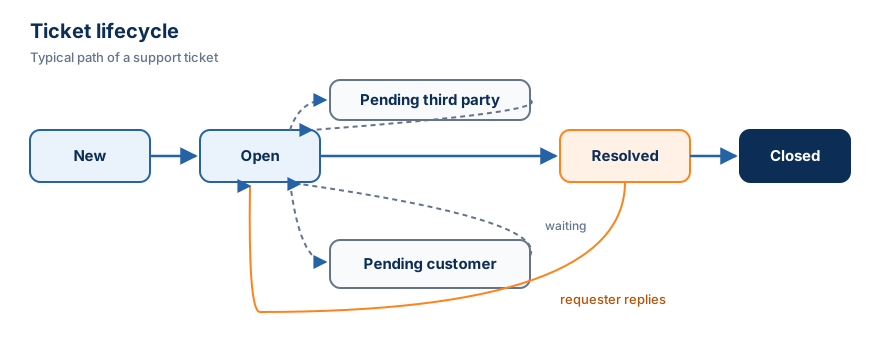
Most ticketing systems use a small set of statuses. A common and practical set is:
- New: the ticket was opened and nobody has handled it yet.
- Open: an agent is working on it.
- Pending customer: the team is waiting for information or confirmation from the requester.
- Pending third party: the team is waiting for a supplier, another department or an external service.
- Resolved: a solution was delivered. The requester can still reply if the problem persists.
- Closed: the case is finished and kept for history and reporting.
Two details make this lifecycle work well. First, the pending statuses separate "waiting on us" from "waiting on someone else", so the team can focus on what it can actually move. Second, when a requester replies to a resolved ticket, it should return to Open automatically instead of being silently ignored.
How a ticketing system works, step by step
Here is a realistic example from an internal IT desk:
- At 9:12, Marta opens a ticket in the employee portal: "VPN disconnects every 10 minutes". She selects the category Network and VPN.
- The category routes the ticket to the IT department with Normal priority. The SLA policy sets a first-response target of 4 business hours.
- At 9:40, Paulo, an IT agent, assigns the ticket to himself. The status changes to Open.
- Paulo adds an internal note: "Third report this week from the São Paulo office. Check firewall timeout." Marta does not see this note.
- He replies publicly asking Marta for her laptop model. Status: Pending customer.
- Marta answers. The ticket returns to Open.
- Paulo finds a configuration problem, fixes it and marks the ticket Resolved, explaining what changed.
- After a few days without further replies, the ticket is closed.
Everything is recorded: who did what, when, and how long each step took. If Paulo goes on vacation, a colleague can read the timeline and continue without asking Marta to start over.
Priorities
Priority answers one question: how quickly should this be handled compared to everything else? Four levels are enough for most teams:
| Priority | Typical meaning |
|---|---|
| Urgent | Many people blocked, or a critical service down |
| High | One person or one important process blocked, no workaround |
| Normal | A problem with a workaround, or a standard request |
| Low | Questions, suggestions, minor issues |
Priority works best when it is defined by impact and urgency rather than by who shouts loudest. Our article How to Prioritize Customer Support Tickets presents a simple matrix for this.
Ways tickets are created
- Portal or web form: the requester fills in structured fields. This produces the best-quality tickets.
- By an agent: for phone calls, walk-ins or messages received elsewhere.
- By e-mail: many systems convert e-mails to tickets automatically.
- Through an API: monitoring tools, websites or internal systems create tickets programmatically.
In Luradesk, tickets are created today through the portal, by agents in the dashboard and through the REST API. Creating tickets from inbound e-mail is planned but not available yet.
Ticketing system vs. spreadsheet
Some teams track requests in a spreadsheet. It is better than nothing, but it breaks down quickly: the conversation with the requester lives somewhere else, two people edit the same row, there is no notification when a status changes and no permission control. A ticketing system connects the record and the conversation, and it enforces who can see and change what.
Benefits of a ticketing system
- Accountability: every ticket has exactly one owner at a time.
- Continuity: the full history travels with the ticket.
- Visibility: the backlog, the overdue tickets and the workload of each person are visible.
- Consistency: the same statuses and priorities across the team.
- Measurement: response time, resolution time and volume by category become numbers you can track.
- Privacy: permissions keep confidential tickets restricted to the right people.
Common mistakes when adopting one
- Too many categories. Twenty categories that nobody understands are worse than six clear ones.
- Everything marked urgent. If priority is not defined, it becomes meaningless.
- Not using pending statuses. Tickets waiting on the customer then look like the team's backlog.
- Accepting requests outside the system. If urgent requests still arrive by private message, the data will never be complete.
Getting started
Begin with one queue, five or six categories, four priorities and the six statuses described above. Ask every requester to use the portal, and register requests that arrive by other channels as tickets yourself. After a month, look at the numbers. If you want to see how Luradesk implements this model, read about ticket management or create a free account.